READING for June 29, 2010
- Cisco Intern Poised to Become Viral Rap Star [VIDEO]
A rather endearing video has been making the Internet rounds of late — a vid featuring the rap stylings of Cisco Systems intern Greg Justice, a.k.a. “The World’s Most Interesting Intern.”
After seeing Justice’s rap on a few other blogs, we hit him up via Twitter to ask what the deal was. Apparently, the 21-year-old Stanford University student is currently working with Cisco’s Communications department to “harness social media to amplify Cisco’s awesomeness.” He was given the opportunity to drop beats on the company blog on a regular basis after his boss heard him rapping in his cubicle. Justice isn’t a stranger to music, either. “I was the frontman for a 5-piece Stanford hip-hop/rock band that failed miserably,” he explains. “More importantly, I grew up listening to the Lion King soundtrack on repeat.”
Justice plans to post a new video on the company blog every week for the next 10 weeks. His goal for the endeavor? “On the one hand, I’d like to pitch exciting products such as the Cisco Catalyst 4948E Ethernet Switch and Flip Video,” he says. “But, truthfully, I just want to make it on The Colbert Report.”
Kidding aside, we think this is a really great way for Cisco to connect with its customers — a way that’s much kinder to its junior staffers than that whole David on Demand/Leo Burnett deal (last time we checked the dude was being forced to get Twitter handle tattoos). What do you think of major companies like Cisco letting loose with a bit of viral inanity? Let us know.
Reviews: Internet, TwitterMore About: humor, MARKETING, software, viral video
For more Web Video coverage:
- Follow Mashable Web Video on Twitter
- Become a Fan on Facebook
- Subscribe to the Web Video channel
- Download our free apps for iPhone and iPad
Digest powered by RSS Digest
READING for June 27, 2010
- This Picture Was Taken 24 Miles In the Air With A Crappy Camera Attached To A Balloon [Photography]
What do you get when you combine a styrofoam box, duct tape, orange paint, a weather balloon, and 2 old Canon cameras? Apparently, images that look like they're from NASA. More »

Photography - Camera - Arts - Equipment and Services - Canon
Digest powered by RSS Digest
#RUNNING: I did it! Ran #Seattle RockNRoll in 2:10
READING for June 24, 2010
- Doctor Who vs Hitchhiker's Guide to the Galaxy
Andrew Orton's "Doctor Who: The Hitchhiker's Guide to the Daleks (The Peter Jones-y Edit)" mashes up the BBC Hitchhiker's Guide to the Galaxy classic TV series with a Tom "the best Doctor Who" Baker encounter with the Daleks.
Mike Richards adds, "An utterly magnificent addition to the only reference book anyone needs. Animated in the same style as the 1980s BBC TV adaptation with a spookily accurate VoiceOver in the style of the late Peter Jones."
The Hitchhiker's Guide Reminds You Not to Panic if You Meet a Dalek
(Thanks, Mike!)
- Douglas Adams's 1990 BBC doc on hypertext, with Tom Baker - Boing ...
- Dr. Who's "regeneration" meant to be like bad acid trip
- Kids' Dalek video
- Retro: Doctor Who advertises Prime Computer
- BBC has Infocom's Hitchhiker's Guide to the Galaxy
- RIP Geoffrey Perkins of Hitchhikers' Guide and Father Ted - Boing ...
- Don't Panic: DIY portable Wikipedia as Hitchhiker's Guide to the ...
Digest powered by RSS Digest
Mrs Bobbi Lanahan singing at the #MusicConcourseBandShell
READING for June 19, 2010
- A photo a day, until he died... (PICS)
Jamie Livingston chronicled nearly every single day of his life in Polaroids, from 1979 to 1997, until he passed away from illness. Poignant and moving.
Digest powered by RSS Digest
READING for June 18, 2010
- The Police Academy Guy's Expansive Oral History of Typewriters [Sound Effects]
If you're curious what the crazy sound effects guy from the Police Academy movies has been up to lately, here's your answer: narrating—if that's the right word—115 years of typewriter history with, well, crazy sound effects. More »

Police Academy - Arts - Typewriter - Recreation - Antiques
Digest powered by RSS Digest
READING for June 14, 2010
- Law.gov: liberating the American legal code
Rogue archivist Carl Malamud sez,
We're setting off some pretty fireworks next week in Washington, D.C. and I wanted to invite people to come watch. Since January, Public.Resource.Org has been organizing Law.Gov workshops all around the country with the help of a stellar cast of co-convenors. Over 500 people have participated in these workshops. The idea of Law.Gov is that government needs to do a much better job of making primary legal materials available. Code is law, law is code, and we think America's operating system ought to be open source.
Next week is the conclusion of the Law.Gov workshops and we're going out with a bang. On Tuesday, John Podesta will be hosting us at the Center for American Progress and the whole thing will be streamed live on the net. There is a really stellar cast of participants including a half-dozen senior administration officials and some well-known net names like Vint Cerf and Tim O'Reilly. Then, on Thursday and Friday, Larry Lessig and John Palfry are hosting us at Harvard for a 2-day wrapup.
Access to the Raw Materials of Our Democracy
(Thanks, Carl!)
- NYT on Carl Malamud's International Amateur Scanning League ...
- Yes We Scan! Carl Malamud for Public Printer of the USA
- Carl Malamud, rogue archivist, in Wired
- Watch America's public domain video treasures, rescue the public ...
- Malamud's "By the People" - stirring history of the Government ...
- RECAP, a Firefox plugin that frees US caselaw one page at a time ...
- Public Resource demands the source code to America's operating ...
- CSPAN embraces freely copyable video
Digest powered by RSS Digest
READING for June 10, 2010
- “Tourist Lane” Stunt Delights and Confuses New York City [VIDEO]
Yesterday, we revealed at the Mashable Media Summit that Improv Everywhere, along with “Self-Appointed City Planner” Jeff Greenspan, were behind that awesome “Tourist Lane” stunt here in New York City. Now, we’ve got a video depicting the hilarity said lane caused.
The “Tourist Lane” (a painted creation located on 5th Avenue and 22nd Street in NYC) spread across the web — from a single photo posted to a blogger’s Tumblr (with no prodding from Improv Everywhere founder Charlie Todd or Greenspan) to major media outlets.
As you can see in the video, it also caused much confusion and delight among tourists and native New Yorkers alike. Check out Improv Everywhere’s site for complete coverage of the prank. What other cities do you think could use a tourist lane?
For more web video coverage, follow Mashable Web Video on Twitter or become a fan on Facebook
Reviews: Facebook, TwitterTags: humor, internet week ny, pop culture, viral video
Digest powered by RSS Digest
READING for June 9, 2010
- Why, no, I am not one bit afraid of these swarming, flying robotic drones
Robotics developers at the Federal Institute of Technology in Zurich's Institute for Dynamic Systems and Control have built autonomous robots that drive, dock with their peers on the ground, then fly into the air in coordinated swarms....all of this without human direction. In fact, the vehicles can drive around on the ground as individual, autonomous units, but "it is not until they assemble that they are able to fly," according to the researchers:
These modules are organized as distributed computational units with minimal sensory input. This is a complex system that is rich in dynamics with much room to explore various strategies of distributed estimation and control.
More about the little buggers here, on the researchers' project website.
Video: Distributed Flight Array (YouTube video from The Institute for Dynamic Systems and Control)
Report on the project here, at Wired Danger Room.
How it all works, in an infographic that follows...

Digest powered by RSS Digest
READING for June 7, 2010
- How-to: DIYDTG

For those unaware, the little acronym above stands for Do-It-Yourself-Direct-To-Garment printing. In layman’s terms, printing your own shirts and designs. Commercial DTGs can cost anywhere from $5,000 to $10,000 which for the hobbyist who only wants a few shirts is ridiculous. So you would think this field of technology would be hacked to no end, but we’ve actually only seen one other fully finished and working DIYDTG. So we took it upon ourselves to build a DIYDTG as cheaply and as successfully as possible.
We would like to take this moment to thank [makemygraphix] for his original designs, as ours is heavily based off his. And Tshirt Forums, for their valuable input.
For your own DIYDTG you’ll need a few parts, (we honestly just used what we had lying around)
-3/4 inch particle board/plywood/MDF
-1/2 inch particle board/plywood/MDF
-1/4 inch plywood
-1 and 1/2inch wood screws
-24inch ball bearing drawer track
-scrap aluminum (1/16″ thick)
-Epson printer (more on this below)The printer you choose is the most absolutely crucial part of this hack. We took apart an HP DeskJet 3845, Canon iP1500, Brother MFC420CN, Epson Stylus Photo 820 and an Epson Stylus c40. Why so many? We literally purchased every printer the local thrift store had (at $6 a printer, it’s not that bad actually), that way the reader wouldn’t have to. Our findings were thus; the HP and the Canon both had rotary encoders on the paper feed shaft and ended up being a total peta to try to align and get working, both not recommended. The Brother was an all-in-one that would not function unless every part was connected, making it too large and bulky for our needs. Both Epsons used stepper motors, were very easy to take apart, and only had one easy to manage paper sensor. Go with Epson! (We ended up using the C40 because it had the 3 ink CYM system instead of the 5 CYMLCLM system the 820 did).
As for the ink you will be using in your printer, we found DTGinks.com to be a good resource.
For software for your Epson, we found the default drivers worked well enough. There is RIP software out there, but we couldn’t find any that supported the c40. We will recommend the SSC Utility program though. Allowing you to quickly and easily lie to the printer about how much, what kind, and replaced ink cartridges (for Epson only).
For tools we recommend the following
-measuring tape
-square
-pen/chalk line
-table saw
-circular saw
-jigsaw
-Dremel
-drill press/drill (and an assortment of bits)
-sand paper/fileWe started off by taking apart the printers. Every printer is different, so we can’t give you details but its relatively simple process. By the end you’ll only need the head and its carriage, the paper feed motor and its shaft, and the power supply.

You’ll need to cut the wood as follows, (it should be noted, these are slightly different then what we actually used)
For the 3/4 inch,
1 x 26inch by 11 and 1/2 inches.
1 x 26inch by 10 inches.For the 1/2 inch,
2 x 26inch by 5inch,
2 x 26 inch by 1 and 3/4 inches.First clamp the two 26″x5″ boards together. Now 6″ from the end and 2″ and 3/8″ from the bottom drill a 5/8″ hole through both boards at the same time. This is where your paper feed shaft will go.
Here is a tricky part, the metal track. We mounted the outer part 3/4″ from the top on one of the 26″x5″(doesn’t matter which you choose) pieces and made the stop/back/end of the track flush with the end of the board (this isn’t very high priority) . And the inner part of the track goes 1″ and 1/8″ from the top on one of the 26″x1 and 3/4″ pieces.
Normally we do recommend that you use metal “L” brackets to attach corners of wood, but as long as you pre-drill a hole slightly smaller than your screws, you’ll be fine (we also counter sunk most of our screws, but that’s optional). Attach the two 26″x1 and 3/4″ to the 26″x10″. Do the same with the two 26″x5″ and the 26″x11 and 1/2″ pieces.
All that was a little tricky, so here is a picture to help out. For those wondering, the top tray rolls “towards” you in this image.

And a shot without the top tray, as you can see our shaft wasn’t long enough, so a simple 2″x3″ piece was put in place. Make sure the shaft spins freely and without binding, with and without the top tray in.

The next interesting part is mounting the drive motor. It needs to be snug against the gear of the shaft, yet not too tight to make it grind against the wood. It also needs to have a way of preventing the shaft from “popping out”. We solved both problems relatively simply.
Take your assembly, remove the top shelf, and prop it on its side. Position your motor where it will be mounted on top/inside the 26″x5″ piece. Drop in the shaft, get everything aligned and draw a circle around the motors base. Using a straight edge and tangent lines you can approximate the center of your circle.

Use a large hole saw cut it out (it doesn’t have to be perfect). Sand/file it so the motor easily fits in without bending any pins. We pop riveted a 1″x3″ piece of aluminum to the motor to make mounting a little easier.

Drop in your shaft and make sure everything lines up. Finally, to prevent the shaft from slipping in, we used the washers and C clamp from the extra printer parts (you didn’t throw away, right?) on the other 26″x5″ piece. And to avoid the shaft from slipping out we took a 1″x10″ piece of aluminum, bent it in a “_n_” shape, drilled a hole for the shaft, and used a cut up spring from the extra printer parts. A picture is worth 1000 words,

Bare with me, we’re almost done!
You’ll need to modify the printer carriage now, simply cut off the slot that paper used to come through,

You’ll want to mount it on-top of the two 26″x5″ pieces about 6″ back. We were lucky and found two of the previous mounting screw holes on the carriage fit perfectly, however other printers you might need to bend or make your own. (This picture taken before we made our nifty “_n_” bracket).

Now we made our platen, this is the thing your shirt goes on. It’s really up to you how its made, and we’re not even totally happy with our design, so play around and find what works best. Ours is 24″x9 and 1/2″ piece of 1/4″ plywood mounted to the top of two 20″x2 and 7/8″ pieces of 1/2″ plywood. The height measurement completely depends on the height of your head. For those wondering, we never got an answer for how far the shirt should actually be from the head, but we’ve found about 1/8″ works well enough. (The “legs” you see on our platen were later taken off.)

Mount your power supply and solder it, alongside your motor, to the driver board.

Now there is one part we’ve neglected to mention until now. And that is the paper feed sensor (remember that one sensor we mentioned earlier?). Well it’s because we spent 3 days trying to get that sucker to work with our platen. We tried everything, different timings and positions of the platen, even programming an MCU to try to trick the printer into thinking the platen was paper. In the end, we just broke it off.
By accident.
And it worked (no really!) It takes a little timing on our part but by hand to trigger the sensor, but we’ve never had a misprint like we did with the platen. (Pictured below, one of our “tape” attempts at triggering the paper feed sensor, this one worked about 1 out of 50 times).

Powered on,

Send a print job, hand trigger the paper feed sensor, and we have a print!

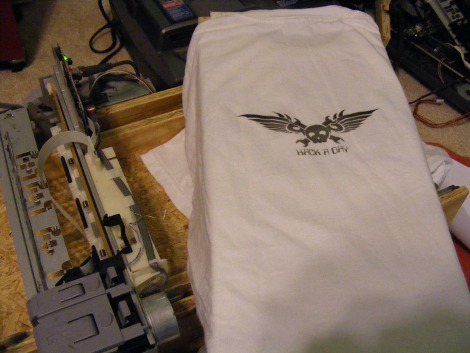
Here is just a short video if it in action, most notably you can see us hand triggering the paper feed sensor. The orange was a test print, as you can see if your platen isn’t 100% flat and level relative to the head, you’ll get some smudging and general print errors. The white shirt was a perfect (well, test) print that we did a little earlier.
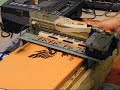
(Yes, we know the video was blocked earlier. We have re-uploaded it, thank you for your patience; it should work now.)
*Disclaimer, using tools without proper ear and eye protection can result in a visit to the hospital. And HaD is in no way responsible for any damages. Be smart, be safe.*
Digest powered by RSS Digest
READING for June 6, 2010
- Inadvertent Tetris in everyday life

"Tetris Tetris everywhere" is a Flickr set by L-Plate Big Cheese, documenting everyday objects that appear to be caught in the midst of a heavy round of tetrising.(via Kottke)
(Image: Tetris Billboard | Vietnam, a Creative Commons Attribution (2.0) image from jesuspresley's photostream)
- First-person Tetris: the whole screen rotates with the block Boing ...
- High-resolution Tetris
- Hi-rez Tetris after two weeks -
- 3D Tetris in Flash - Boing Boing
- Homemade Tetris blanket Boing Boing
- Help a gamer find an elusive Tetris knockoff. - Boing Boing
- Hatetris: the meanest Tetris clone you've ever played - Boing Boing
- Tuper Tario Tros: Super Mario meets Tetris Boing Boing
Digest powered by RSS Digest
READING for June 5, 2010
- Murder the Internet

The New Yorker has a blog post up about how Jonathan Lethem paid someone to completely remove the internet from his laptop so that he could write without distraction.
You should imagine my computer set-up guy’s consternation when I insisted he drag the Internet function out of the thing entirely. 'I can just hide it from you,' he said. 'No,' I told him, 'I don’t want to know it’s in there somewhere.'"
If you're looking for a way to write fiction without distraction and you don't want to lobotomize your laptop, I suggest you take a look at an Alphasmart NEO. It's a simple, under-$200 battery-powered word processing device that's tough as a Tonka truck. It auto-saves, and it holds about 200 pages. The one problem with it is that the screen only displays about eight lines of text at a time, which makes editing nearly impossible: When you're ready to edit, you have to hook it up to your computer via USB, dump the whole thing into a text document, and work on it the, um, old-fashioned way, which means you are yet again at the mercy of the internet. Still: My NEO is one of the few tech devices that has actually made my life easier. You should consider it before you Lethemize your computer.
[ Subscribe to the comments on this story ]
Digest powered by RSS Digest
READING for June 4, 2010
- Guatemalan Sinkhole Video Is Just as Scary as the Photos [Science]
Finally, someone got a helicopter and filmed the Guatemalan Gates of Hell. The 200-feet deep sinkhole—which swallowed a clothing factory—was caused by tropical storm Agatha's torrential rains. What I want to see now is someone exploring the bottom. More »

Guatemala - Central America - Guatemala City - Sinkhole - Tropical cyclone
Digest powered by RSS Digest


Get real-time news from Belltown & nearby via my side project: